Batch process images
BIMP Lite is a free software only available for Windows, that belongs to the category Design & photography software with subcategory Retouching & Optimization.
Top Recommended Alternative
More about BIMP Lite
BIMP Lite is a slick program that will require less free space than most software in the section Design & photography software. It's very heavily used in some countries such as Netherlands, Canada, and United Kingdom.
Since the program joined our selection of programs and apps in 2005, it has obtained 32,310 installations, and last week it had 16 downloads.
The current version of the program is 1.62 and it has been updated on 2/13/2007. It's available for users with the operating system Windows ME and former versions, and you can get it in several languages like English, Spanish, and German.
Passive FTP server bug fixed
Output folder selection bugs fixed
FTP connection code cleaned

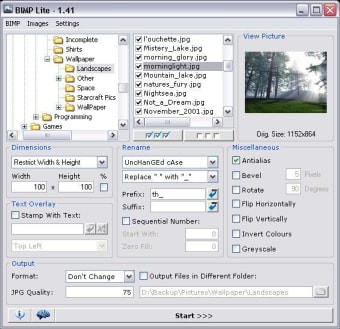
BIMP Lite is a small and simple batch processor for image files, that allows you to perform various functions on multiple images. It can be used to create thumbnail images from your pictures, add a prefix/postfix (with meta variables), rename using a sequential number, change the case of filenames, replace/remove spaces & underscores, flip or rotate images and also apply anti-aliasing, inverse, greyscale and bevel effects.
Thumbnail resizing allows you to force a specified width or height and keep the proportions, or define fixed image dimensions. Images can have text overlayed on them at any corner or side, as well as the center of the image. This text can include meta variables such as image height, width, number of colours etc. In addition, the program can also convert the file format to GIF, JPG, PNG, BMP, MIFF, TIFF, PCX or TGA. All of the actions can be performed individually, or combined. BIMP now also includes an FTP client, so you can automatically output images to a remote server via the File Transfer Protocol.